White label rank tracker for Google Maps
Send clients Google Maps grid reports and a weekly email under your agency's name, logo and color. What carries your brand, what does not, and which plans include it.
A Google Maps grid report is most useful when it reaches the client without a detour through someone else’s brand. On the Agency and Agency+ plans, GridWhy puts your agency’s name, logo and color on everything a client sees, and leaves its own name off. This page lists exactly what is branded, and what is not.
What carries your brand
The shared report. Every scan can get a share link. The page behind it shows your logo (or a letter mark in your color if you have not uploaded one), your accent color in the header stripe and as the browser’s theme color, and your name in the browser tab: “Your Agency — Local rank report”. The tab icon is your logo. The preview image that appears when the link is pasted into a chat or an email is neutral, so it never shows our logo. The words “GridWhy” do not appear anywhere on the page.
The report itself is the full scan: the rank at every grid point on a map, the change since the last scan with the reasons behind it, the next steps, and the top 10 at the center.
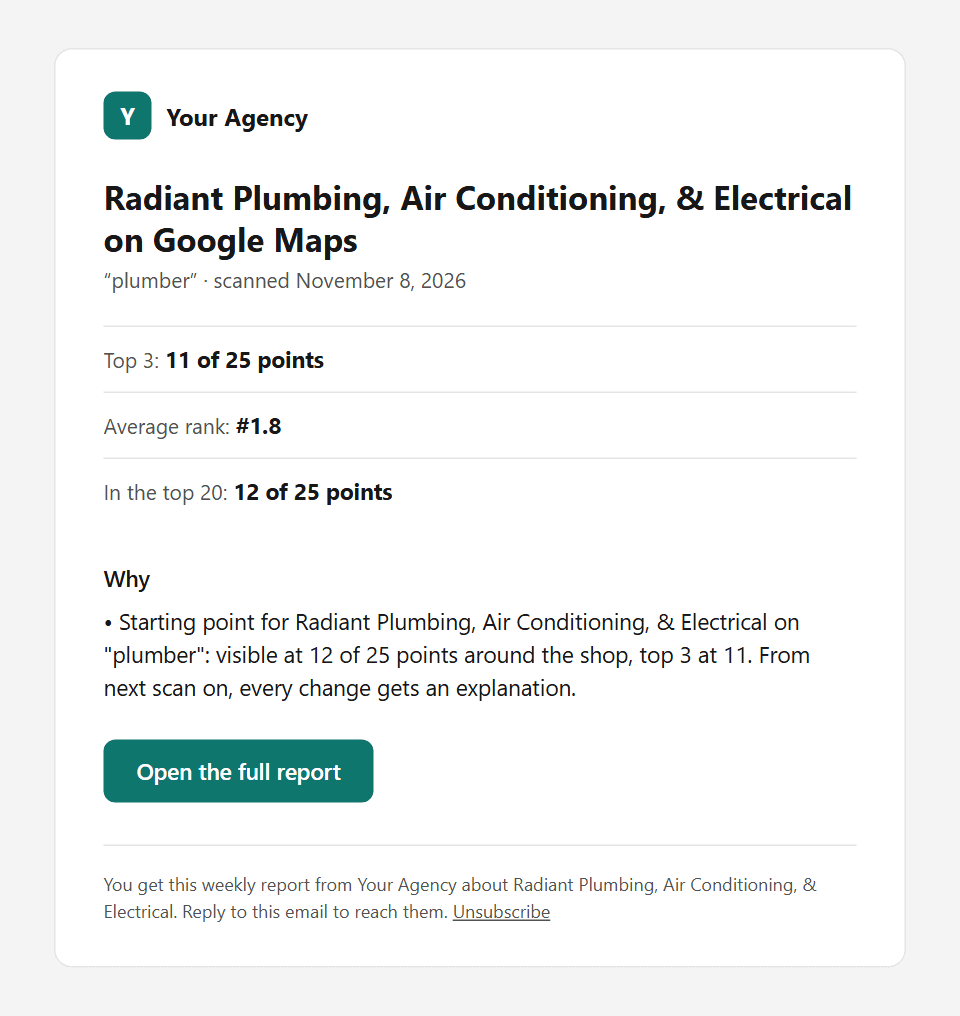
The weekly client email. After the scheduled scan of the keyword you choose, the client gets a short email: top 3, average rank and top 20 coverage with the change since the previous scan, up to two lines on why it changed, and a button to the full report. It shows your logo and color, the sender name is your agency, and replies go to you. Here is the email for our public demo scan, with an example brand:
The unsubscribe page. It is neutral: no GridWhy logo, no GridWhy name.
What does not
- Report links are on our domain: gridwhy.com/share/ plus a long random code. Custom domains are not available.
- Emails go out from our sending address. Your agency is the sender name and the reply-to address, but the address itself is ours.
- Your own dashboard is GridWhy. Clients never see it, and they do not get a login.
Setting it up
- In Settings → White label, enter the name clients should see, pick an accent color and upload a logo (PNG, JPEG or WebP, up to 100 KB). A preview shows the report header as clients will see it. If you save nothing, reports use your workspace name and a letter mark.
- On each location, switch on the client email, add up to 3 addresses and pick the keyword the email reports on. One email per address per week.
- Send yourself a test email first (5 a day). Test emails only ever go to your own address.
Built for agencies with 5–25 local clients
The branding is one part of a weekly routine that runs without you opening a dashboard for every client. What GridWhy does for an agency today:
- Scans on a schedule. Each client’s grid runs weekly or every two weeks at the hour you pick, in the business’s time zone. Every scan has a run log with the planned and the actual start time, and the on-time rate across all accounts is public on the status page. A failed scan is retried, and you get an email if it still fails.
- A likely reason with each change. After every scan, the scan page lists what changed since the last one and the likely cause (a competitor that rose or fell, review pace, points gained or lost, a category change), each with a line you can paste into a client update and up to three next steps. Mark a step done and the next scan shows how the grid moved after it.
- Reports that go out on their own. The weekly client email and the shared report described above, for up to 3 addresses per location.
- History that is kept. Every scan stays, so the trend is there when a client asks what the last six months looked like.
- Answers from your AI assistant. The MCP server lets Claude, Cursor or ChatGPT read the history, explain a change or start a scan for any client, on every plan.
- A first look at prospects. The free local rank checker runs a 3×3 grid on any business in the US, the UK, Australia or Canada, no access to its profile needed, with a link you can send before the first call.
Solo covers 5 locations, Agency 10 and Agency+ 25, each counted as one business address. Clients do not get their own login; there is one workspace per agency.
Which plans include it
White-label reports and the branded client email are part of Agency ($69 a month, 10 locations, up to 200 keywords) and Agency+ ($129 a month, 25 locations, up to 500 keywords), and of the 14-day trial, so you can try it with a real client before paying. On Solo the client email and shared reports work the same way, but show the GridWhy name and a small “Powered by GridWhy” line. See all limits on the pricing page.
Every plan is a flat monthly price, so sending a branded report every week costs nothing extra. If you are comparing this with credit-based tools, read how GridWhy compares with other geo-grid trackers. If you write client reports by hand, our free local SEO report template has the same sections: the grid, the change, the reason and the next steps.
FAQ
Which plans include white-label reports?
Agency ($69 a month) and Agency+ ($129 a month), and the 14-day free trial. On Solo, shared reports and client emails carry the GridWhy name.
Can I use my own domain for report links?
No. Report links are on gridwhy.com/share/ followed by a long random code. The page itself shows only your brand, but the address is ours.
Who do client emails come from?
From our sending address, with your agency name as the sender name. Replies go to the email address of your account, so a client who answers reaches you.
Can the client turn the weekly email off?
Yes. Every email has an unsubscribe link for that address and that business. Addresses that bounce or mark the email as spam are not mailed again.
Do my clients get a login?
No. They read the email and open the shared report from its link; no account is needed. Turning off a link makes it stop working at once.