Diagnosis
Why did my Google Maps ranking drop? How to find the cause in 10 minutes
A ranking drop has a shape. Check whether rankings or searches fell, see where on the map it happened, and the likely cause narrows to one or two.
· Updated · GridWhy
You searched the main keyword this morning and the business was not in the top three. Your Google Maps ranking dropped, and the instinct is to change something right away: the name, the category, the hours.
Wait ten minutes. One search from one phone is one point on the map, seen by one account. Before asking why, answer two smaller questions: what dropped, and where. The answers usually point at one or two causes, each with a different fix.
Step 1: Did rankings drop, or did searches drop?
Open the Business Profile and go to Performance. Two numbers matter here:
- Searches: how many times the profile showed up in search. Google updates this metric once a month, at the start of the month (Google Business Profile Help), so compare the last full month with the one before.
- Calls: how many times someone tapped the Call button on the profile. This one you can compare over the last 4 weeks against the previous 4.
Read them together:
- Searches steady, calls down. Visibility is fine; people see the business and do not call. Check the hours, the phone number, a phone menu that loses callers. Practitioners also report Maps views where the Call button sits one tap deeper, inside the profile.
- Searches down, calls down. Fewer people see the business. That is a ranking problem; go to step 2.
- Searches down, calls steady. Often seasonal demand, or fewer branded searches. Check the same month last year before acting.
Step 2: Where did it drop?
A Maps ranking is not one number. Google says local results are mainly based on relevance, distance, and how well known the business is (Google Business Profile Help). Distance means the rank is different on every street, so check the keyword from several points around the business. A 5×5 grid of 25 points is enough to see the shape.
Four shapes come up again and again:
- It dropped everywhere at once. The whole grid moved down together, near the address and far from it. That points at something that applies to the business as a whole: an algorithm or core update, or a problem with the profile itself, such as a filter or a suspension.
- It holds near the address, but the outer ring is gone. The business still ranks within a mile or two and disappears beyond. Usually a closer or stronger competitor took the outer points, or its categories match the search less well.
- One direction went dark. Fine to the north and west, gone to the east. That is usually one competitor on that side: a new location, a burst of reviews, a name or category change.
- Weak even next to the address. If the business cannot hold the top three a few blocks from its own front door, distance is not the problem. Relevance is: the wrong primary category, missing services, a profile that does not say what the business does.
The six most common causes, and how to check each
Each comes with the symptom, a two-minute check and what to do.
1. A competitor's review pace. Symptom: one area dims while one competitor rises there. Check: open that competitor's profile, sort reviews by newest, and compare last month's count with yours. What to do: Google says more reviews and positive ratings can help local ranking (Google Business Profile Help). Answer with a steady, honest request process, not a one-week push.
2. A primary category change, yours or theirs. Symptom: a sudden shift on one keyword while related keywords hold. Check: compare the primary category on both profiles with what they showed last month (old screenshots or your own notes). What to do: Google asks for categories that describe the core business and as few as possible (Guidelines for representing your business). If yours drifted, put it back. If a competitor picked a category that does not describe them, that is worth a suggested edit.
3. A competitor's name change or keyword stuffing. Symptom: a business you have never heard of jumps into the top three with a name like "Best Plumber Austin 24/7". Check: compare the name on Maps with the name on their sign, website and invoices. What to do: Google's guidelines do not permit unnecessary information in a business name (Guidelines). Start with Suggest an edit on the listing (Google Maps Help). If that does not stick, and the name, phone number or URL is misleading or fraudulent, use the Business Redressal Complaint Form. Google reviews only those three fields there.
4. Proximity: a new competitor nearby. Symptom: the drop is centered on one area, and a business that was not there last month now ranks at those points. Check: look up the newcomer's address and opening date. What to do: nothing quick; you cannot move the address. Strengthen relevance and reviews and expect to share the overlap area.
5. A filter or a duplicate profile. Symptom: the business vanishes at points where it used to be strong, while another listing at the same address, or with the same phone number or website, appears instead. Check: search the phone number and the website domain in Maps; count the listings. What to do: Google's guidelines allow one profile per business (Guidelines). Practitioners report that when two listings share a phone number or website, Google often shows only one of them. Remove or merge the duplicate before anything else.
6. A core update. Symptom: the whole grid shifts at once and competitors' grids shift too. Check: look up the Google Search Status Dashboard for an update that started around the date of the drop. What to do: see the next section.
Core update or competitor?
The grid answers this better than any single search:
- The whole grid slid together, and the competitors around the business moved too: likely an update.
- One area slid and the rest held: likely a competitor, and steps 2 to 4 above apply.
Google's documentation on core updates is written about Search and does not mention Maps or local results (Google Search Central). Practitioners do report local rankings moving while a core update rolls out, so it is worth checking the dates. The November 2026 core update started on November 10, 2026, and Google said the rollout may take up to two weeks.
During a rollout, avoid large changes: anything you change gets mixed into the movement. Google's own advice for Search is to confirm the update has finished, then wait at least a full week before analyzing (Google Search Central). The same patience works on Maps: compare a scan from about a week after the rollout ends with one from before it started.
What not to do in a panic
- Do not add the city or keywords to the business name. It is against Google's guidelines and can lead to a suspension (Guidelines), which is a much bigger drop than the one you are fixing.
- Do not keep switching the primary category. Each switch resets what you are measuring. Pick the category that describes the core business and leave it.
- Do not play games with the address or the hours. Google's guidelines say a virtual office the business does not operate from is not eligible for a profile, and ask for the regular hours customers can actually use (Guidelines). Breaking them can get the information changed or removed, and customers notice hours that are not real.
- Do not change five things on the same day. If the ranking comes back, you will not know which change did it. One change, then a week of measurements.
A real example
Here is one scan from our public demo, a large plumbing company in Austin, Texas, for the keyword "plumber". It covers 25 points in a 5×5 grid at zoom 13, signed out, taken on November 8, 2026.
- The business was in the top 20 at 12 of 25 points and in the top 3 at 11.
- Every point where it appeared was within about 5.6 miles of its address. The points where it was missing were 5 to 7 miles out.
- It has 18,152 reviews. At the 13 points where it was missing, the top three businesses had a median of 625 reviews.
So reviews are not what keeps it out of those neighborhoods. Distance is. More reviews would not change this picture; the real question is whether the business wants to be found 5 to 7 miles away at all.
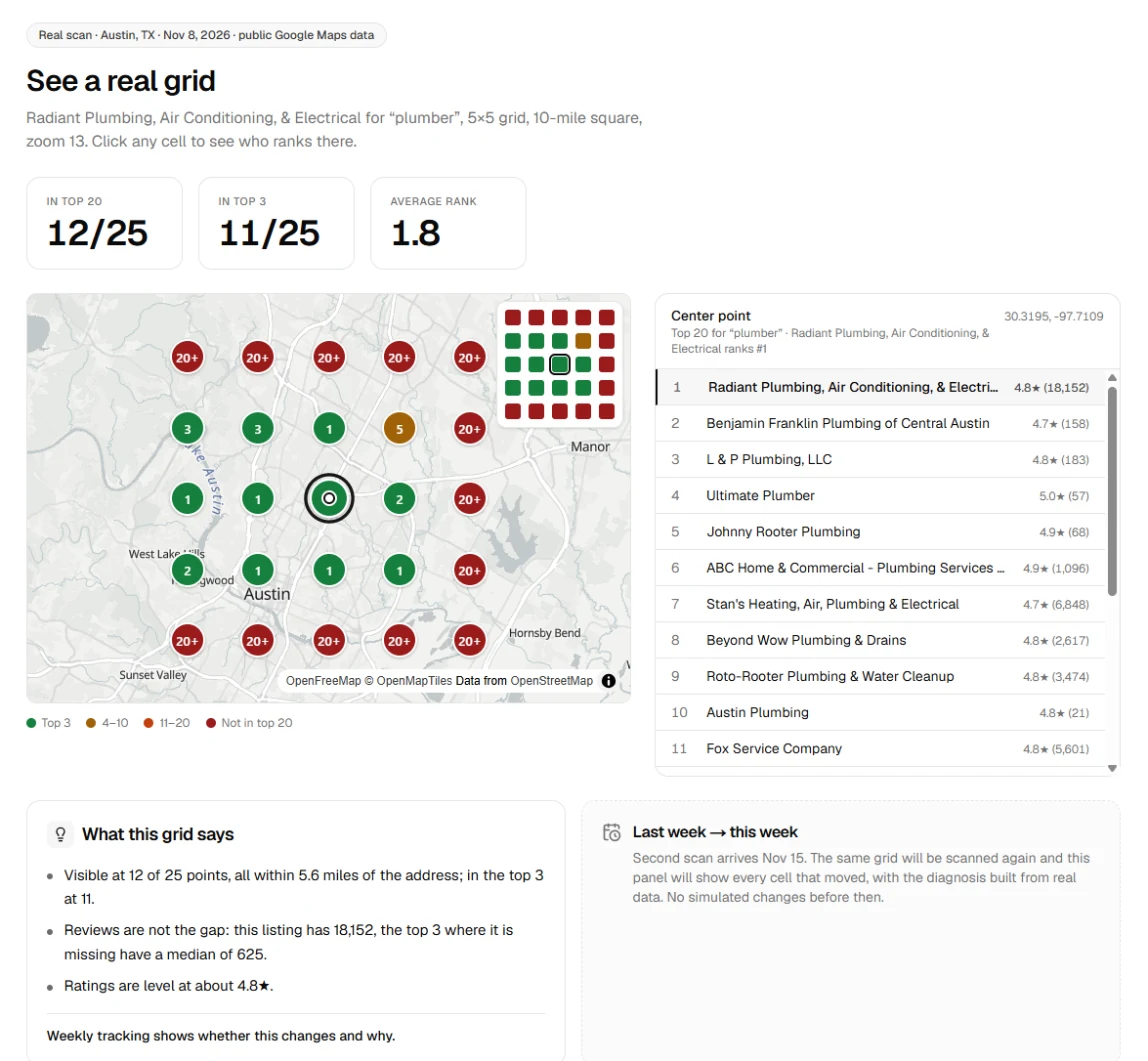
You can click through the same scan point by point on the demo page.
How to measure it so the trend is real
A search from your phone is personalized and centered wherever Maps decides. To see a drop, and later a recovery, the measurement has to be repeatable:
- Fixed points. The same grid of coordinates every time, around the business.
- Signed out. No personal history moving places up.
- A fixed zoom. The zoom level decides which businesses can appear at all. We use 13 for every scan.
- The same keyword, written the same way.
- Weekly. Daily checks add little: in the short term the grid barely moves. In our scans, two runs of the same grid 51 minutes apart left the target's ranks identical, and of 499 business positions on the grid, 453 did not move, 44 moved by one place and 2 by two. Real changes show up over days and weeks, so a weekly scan is enough to see them.
That is what GridWhy does every week, and it explains each change it finds. If you only want a quick look first, the free local rank checker runs a 3×3 grid without an account.
FAQ
Why did my Google Maps ranking drop overnight?
Usually something changed around the business, not in it: a competitor gained reviews, changed its name or category, or opened nearby. A core update or a profile problem is likely when the ranking dropped at every point at once.
Do core updates affect Google Maps rankings?
Google's core update documentation describes changes to Search and does not mention Maps. Practitioners report local rankings moving during rollouts. If the whole grid shifted together during a rollout, wait until it ends, then compare about a week later.
How much do reviews affect Maps rankings?
Google says more reviews and positive ratings can help local ranking, alongside relevance and distance. Reviews do not override distance: a business with 18,000 reviews can still be missing five to seven miles from its address while businesses with a few hundred rank there.
My phone calls dropped but my ranking didn't. Why?
If searches held steady, people still see the business and are not calling. Check the hours, the phone number, any phone menu, and how the listing shows in Maps. Practitioners report that in some views the Call button sits inside the profile instead of on the result.